
Integrations
This section lists the available integrations.
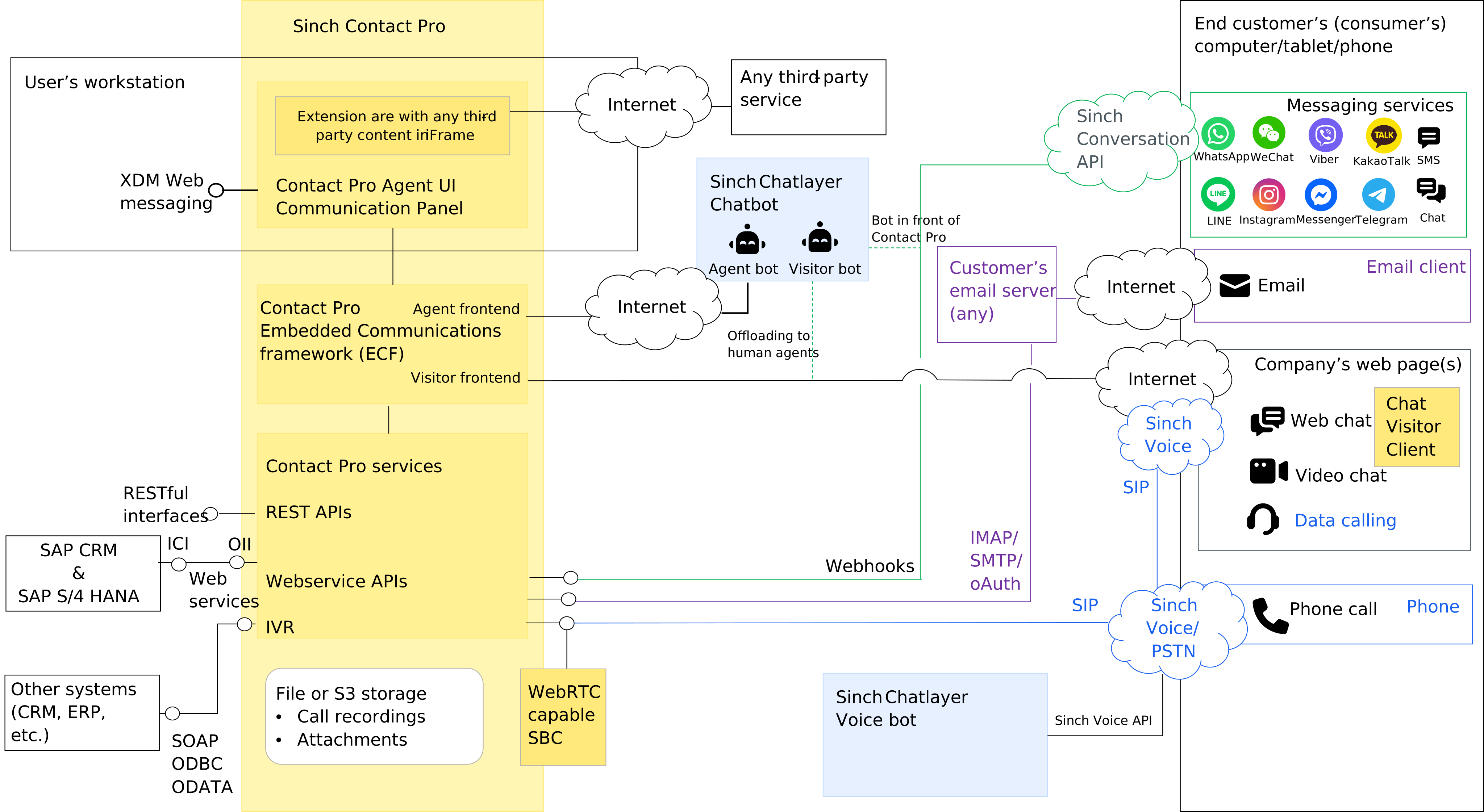
The image below shows Sinch Contact Pro integrations.
Voice
A SIP trunk is needed to carry voice calls between the telephone network (PSTN) and Sinch Contact Pro. The customer can enable voice calls by:
- Subscribing to a SIP trunk and telephone numbers through Sinch Voice API
- Subscribing to a SIP trunk and telephone numbers from any telephone operator
- Providing a SIP trunk and telephone numbers from the customer’s own or managed IP PBX or SBC.
SIP trunks from Sinch
Sinch SIP trunk enables Sinch Contact Pro customers to make, receive, and monitor calls globally. Both inbound and outbound calls, including international calls, are supported. Telephone numbers are available globally.
Sinch Voice SIP trunk is delivered over the Internet and it is pre-integrated to Sinch Contact Pro which guarantees fast delivery. To obtain Sinch Voice SIP trunk, please contact Sinch sales.
SIP trunks from third parties
Sinch Contact Pro supports SIP trunks from any operator. SIP trunks can be connected to Sinch Contact Pro either over the Internet or using AWS Direct Connect. Internet SIP trunks shall use secure protocols (SIP/TLS & SRTP). AWS Direct Connect connections are private and are available from operators or Amazon Partner Network (APN) partners. The customer is responsible for ordering SIP trunks from third parties. For details, please contact Sinch.
SIP trunks from PBX
The customer can also connect SIP trunks from their own or managed PBX to Sinch Contact Pro. These SIP trunks can also be connected to Sinch Contact Pro either over the Internet or using AWS Direct Connect. Internet SIP trunks shall use secure protocols (SIP/TLS & SRTP).
Messaging
SMS
Sinch SMS API and Conversation API support sending and receiving SMS messages. Both APIs are pre-integrated to Sinch Contact Pro, which guarantees smooth and fast roll-out.
Sinch Conversation API
Sinch Conversation API is the easiest way to integrate the most popular conversational messaging channels to Sinch Contact Pro. Like Sinch SMS API, Sinch Conversation API is pre-integrated to Sinch Contact Pro. Receiving and answering messages in both text and rich content formats is supported. Sinch Conversation API supports the following channels:
- SMS
- RCS
- Viber
- Facebook Messenger
- MMS
- Telegram
- KakaoTalk
- Line
- Sinch Chat.
Sinch Contact Pro can be integrated into a customer’s email server, such as Microsoft 365. To enable email integration, the customer shall provide one or more IMAP inboxes. Sinch Contact Pro polls these inboxes for new emails and routes them to agents. Replies to these emails as well as email notifications are sent by Sinch Contact Pro to the customer’s SMTP server.
Chat
The Visitor Chat client application makes it possible to embed a chat window on the customer’s web site. Visitor Chat provides:
- Easy embedding in any web page with HTML code or Javascript
- Continuous chat, visitors can move across pages while chatting
- A floating chat frame
- Responsiveness to screen size, works also with mobile devices
- Anonymous or authenticated chatting for visitors
- An easy-to-use configurator for defining the chat window appearance and functions.
For different chat options and their supported functions, see Service configuration.
Other business systems
Salesforce
Salesforce integration offers a fully functional Communication Panel inside Salesforce embedded mode. All features and functions that work in a standalone Communication Panel also work in the embedded mode.
Salesforce integration supports the following functionality:
- Customer identification for incoming calls, live chats, social messages, and emails
- Outbound calls: Click-to-call from Salesforce
- Saving of agent’s notes to Salesforce
- Chat and social messaging transcripts transferred to Salesforce after the conversation is handled
- Conversation links are stored in Salesforce tasks. Agents can click on them to view the conversation in CP along with transcripts, recording, and any notes the agent has in the contact center.
- Searching contacts, cases, leads, and accounts. If there are multiple search results for a customer number or email, the user can select the correct search result per incoming or outgoing conversation.
ServiceNow
Sinch Contact Pro can be integrated with ServiceNow. The integration is done using an openFrameAPI. Phone, chat, and messaging channels including live web chat, SMS, Facebook Messenger, and WhatsApp are supported.
An agent can click on a phone icon in ServiceNow to start a call in Communication Panel. For incoming calls, ServiceNow identifies the caller, initiating a new conversation, and an incident can be created.
When the agent signs into ServiceNow, the status in Communication Panel is automatically updated according to the status in ServiceNow. If ServiceNow status is:
- Online, Communication Panel status is Ready
- Offline or Away, Communication Panel status is Not Ready.
When an agent switches between Ready and Not Ready in Communication Panel, agent status changes between Offline and Online in ServiceNow.
Microsoft Dynamics 365
Sinch Contact Pro voice channel can be integrated with Microsoft Dynamics 365.
For incoming queue calls, direct calls, SMS, and WhatsApp messages, the caller's phone number is searched in Dynamics and:
- In case of a single match, the account/contact is opened for the agent to take notes.
- In case of no match found, the agent is offered a contact form to create a new contact.
- In case of multiple matches, the results are displayed to the agent, and the agent can confirm the account/contact manually.
Outbound calls can be made using click to call:
- Clicking the phone icon next to a phone number triggers an outbound call from Communication Panel.
- The contact that matches the clicked phone number is opened for the agent to take notes.
- If the agent calls out using Communication Panel’s dial pad, the contact/account is searched in Dynamics and displayed to the agent.
SAP Service Cloud (C4C)
Communication Panel can be embedded in SAP Service Cloud (C4C) Live Activity view, providing support for the following Service Cloud features:
- Incoming call: customer identification by the caller's telephone number
- Incoming email: emails processed in Communication Panel are uploaded to Service Cloud
- Automatic info storing for call events in Service Cloud
- Incoming chat: customer identification by the customer's email address given in chat
- Automatic info storing for chat events and transcripts in Service Cloud
- Click-to-call functionality.
Additionally, Service Cloud users can utilize other features Communication Panel has to offer, such as:
- Recording a call
The call is shown in C4C history with the recording flag.
- Outbound campaigns
- Callbacks
- Joining and leaving queues
- Viewing queue alerts
- Changing their status
- Viewing daily statistics.
Integration with SAP CRM and S/4HANA
Communication Panel can be integrated into SAP CRM and S/4HANA for customer management.
The integration enables contact handling in both Communication Panel and the Interaction Center in either SAP CRM or S/4HANA. The supported channels are call, chat, action item, email, and any other channel that can be converted to email. Also multi-chat (handling several chat discussions simultaneously) is supported.
End-customers are identified based on phone numbers and email addresses, and all conversation events are stored in SAP CRM or S/4HANA as customer interactions.
With Communication Panel, customer service agents can:
- Manage their logins to conversation queues they are entitled to
- Manage their presence/absence status with profiles
- View daily statistics and the current situation in queues.
SAP Emarsys Integration
Customer reply messages resulting from an SAP Emarsys campaign can be handled in Sinch Contact Pro’s Communication Panel. The target contact list is exported in CSV format from SAP Emarsys, and a WhatsApp campaign message can be sent to these contacts via the Sinch Campaigns tool.
When a customer clicks an option in the WhatsApp campaign message, the conversation is routed to a live agent who can continue the conversation with the customer. In the extension area, the agent can see the customer details from SAP Emarsys as well as Sinch Campaigns information that was used to create the initial campaign message.
Microsoft Teams
This integration synchronizes agent’s Sinch Contact Pro presence with Microsoft Teams in the following way:
- Agent’s Sinch Contact Pro
Ready status is set to Not Ready when agent’s Team status gets Busy.
When agent is using MS Teams and Communication Panel and becomes busy on the Teams due to an incoming call or joins a conference, then their status in Sinch Contact Pro is changed to Not Ready. When the agent becomes free from the Teams Conference/Call, and their Teams status reverts to available, then the status inCommunication Panel also changes back to Ready.
- Agent’s Teams status set to Busy when agent is taking calls in Sinch Contact Pro.
Agent is using MS Teams and Communication Panel, answers to a queue call in Communication Panel, then their Teams status is automatically changed to Busy (in Call). When the agent closes the call in Communication Panel, the status is reverted to Available in Teams. Agent’s Teams status is not changed in case its other than Available when agent gets busy in Sinch Contact Pro, for example Away or Offline.
Chatbot Integration
Sinch’s own chatbot Chatlayer is integrated with Sinch Contact Pro. It has built-in capabilities to transfer chats from the chatbot to Sinch Contact Pro queues. Chatlayer can be connected either as:
- an agent bot, where the bot is a part of the contact center flow, or
- a visitor bot, in front of the contact center.
In addition to Chatlayer, Sinch Contact Pro has an open chatbot API that allows integration for any third-party chatbot vendor.
Chatbot integration includes features such as “fallback to agent”, which allows the chatbot to forward the chat (including the full transcript) to a live agent in Sinch Contact Pro if the chatbot is not able to satisfactorily resolve the customer’s issue.
Integration Interfaces
Integration interfaces allow various business systems to interact with Sinch Contact Pro. They are published via AWS API gateway and access is controlled with strong user authentication and API keys. To use integration interfaces, please create a service request via Sinch Support portal.
This section provides a brief description of each interface. Technical interface descriptions are available in Sinch Contact Pro documentation.
RESTful Outbound Campaign Interface (OBI)
The RESTful Outbound Campaign Interface provides the ability to view, manage, and control campaigns. You can, for example, read and control campaign statuses, add customers to campaigns, and remove customers from campaigns.
RESTful Monitoring Interface (RMI)
The RESTful Monitoring Interface provides statistics of conversations, agents, and queues from the monitoring database. It allows you to monitor what is going on in Sinch Contact Pro. You can, for example, see queue and user statuses.
RESTful Analytics Interface (RAI)
The RESTful Analytics Interface provides statistics of contacts, agents, and queues from Monitoring and Reporting Databases. It provides the ability to integrate external reporting systems and Workforce Management (WFM) systems.
RESTful Task Interface (RTI)
The RESTful Task Interface allows you to create and route tasks in Sinch Contact Pro. Tasks are routable objects that are created to Sinch Contact Pro via RTI. Tasks can originate from various business systems, such as CRM and web forms, and can include text and different key values. Tasks are routed to agents and handled like emails.
RESTful Directory and Presence Interface (DPI)
The RESTful Directory and Presence Interface allows you to manage directory entries in Sinch Contact Pro. It provides directory data and presence information for users and queues.
RESTful Contact Management Interface (CMI)
The RESTful Contact Management Interface is a collection of resources that allows you to create and control certain types of conversations. Supported resources are listed below.
- Emails allows you to read email message details and content from the system.
- Script Results allows you to read the results of scripts. Scripts are questionnaires that you can fill out while or after handling a conversation.
- Chats allows you to read chat content and details, as well as to insert historical messages, used to keep a complete conversation history including also messages sent by other applications, e.g. chatbots or marketing automation tools.
- Call Recordings allows you to read recording related data and the listening log.
- Callbacks allows you to create, modify, and delete callback requests in the system.
- Contacts is a general resource for all conversation types, and you can read conversation specific details from this resource.
- Messages allows you to create text messages and social messages to be sent via Sinch Contact Pro. You can send a message to one or more numbers.
RESTful Configuration Interface (RCI)
The Restful Configuration Interface is a collection of resources that allows you to change various configuration settings of the Sinch Contact Pro system. These configurations include, for example, users, roles, and queues.
Online Integration Interface (OII)
OII is used when integrating SAP CRM and Sinch Contact Pro. OII is originally developed to integrate Sinch Contact Pro to SAP CRM ICI interface but it can be used to integrate other systems as well. OII is based on SOAP.
Client-side interfaces
Sinch Contact Pro Visitor Intermediate Client API
Visitor Intermediate Client API allows you to create a visitor chat client for your web pages. The API creates an iframe and loads the visitor application inside the frame. It provides simple functions to instruct the application and uses cross-origin communication to send command messages between the application and the client.
Communication Panel Third-Party Extension Messaging API
Third-party extensions are custom UI extensions for Communication Panel. They are normal HTML pages running inside an iframe in Communication Panel. There are two types of extensions: global and conversation specific. The lifecycle of global extensions is from user login to logout. In contrast, conversation-specific extensions are loaded once the user accepts the offered conversation and removed when the user is done handling the conversation.
Third-party extension messaging API is an interface that provides the ability to exchange messages between the Communication Panel user interface and a third-party application in the Extension Area. The interface allows, for example, reading conversation data, such as a phone number, an email address, and conversation attached data, from Communication Panel. You can also command Communication Panel to call out, transfer a call, or send a new message from an application that is running in the Extension Area.