
Getting started
This section introduces calendar and schedule concepts.
What is a calendar?
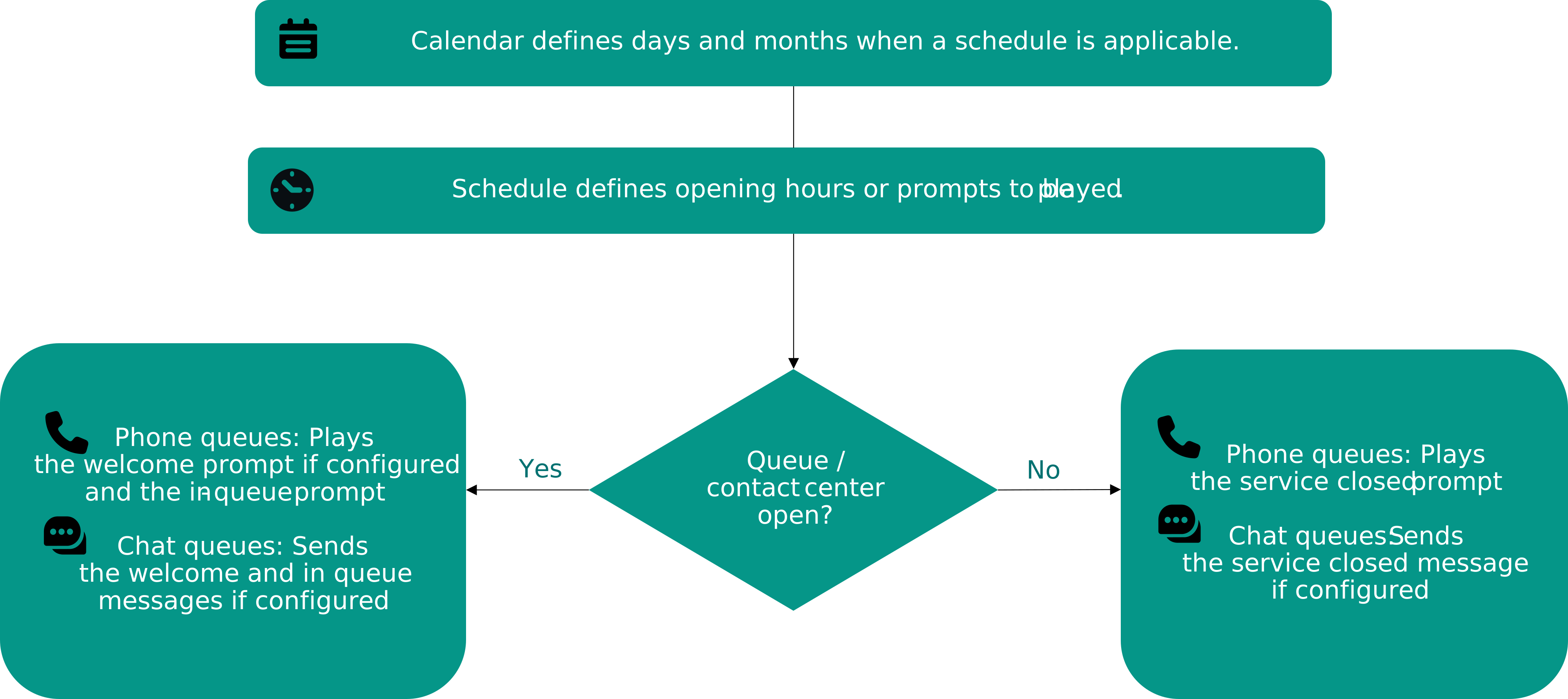
Calendars are used for defining the days and months when a schedule is applicable. You can include and exclude weekdays, yearly calendar days, or time ranges. The system contains a calendar called Default. It cannot be opened, modified, or deleted. Each calendar has a unique priority value which you set when you create a calendar, and if several calendars are applied simultaneously, the calendar with the highest priority is used. The Default calendar has the priority value 0, and you can use it with schedules for regular service times.
What is a schedule?
Schedules are used to define:
-
service times that define when the contact center or queues are open. Conversations are accepted into queues according to these defined times. When the contact center or queue is closed, the system plays the built-in default audio prompt service closed. You can override this prompt by adding a schedule for some other prompt.
-
prompts for queues and users. Since this document focuses on defining service times, see Prompt management for more information.
How they work together
The following figure shows the logic of calendars and schedules. You need a calendar for being able to define opening hours for your service.
Email queues handle schedules differently from other conversation types. While schedules determine when other queues accept incoming conversations, an email queue always accepts incoming messages.
For email queues, the schedule's only function is to define the service hours used for calculating waiting time statistics. The time an email waits outside of the defined service hours is not included in the reports.
If a queue's service hours are 9:00 AM to 5:00 PM, and an email arrives at 8:00 AM and an agent handles it at 10:00 AM, the reported waiting time for that email is one hour.