View and edit customer information in SC
You can view and edit the customer information such as phone numbers you have imported to the campaign. You can also view the progress and results of a campaign.
-
In , search for your campaign.
-
Select the campaign row and click Customers.
-
To select which columns are shown in the Customers view, click the Personalize button.
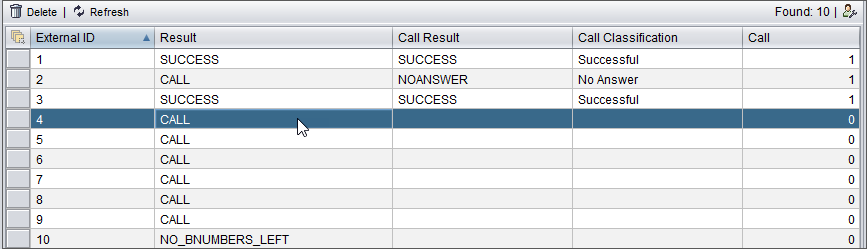
The customer view opens with columns listed in the table below.
Table 1. Column Description External ID
The customer ID number that is mandatory in the campaign data import
B Numbers
The Phone1, Phone2, and Phone3 attributes defined in the campaign data
Result
The current calling status of the customer in the campaign, automatically assigned by the system
Results such as CALL and DIALING mean that there are call attempts remaining.
Call Result
The technical call result, such as SUCCESS, REFUSAL, or NOANSWER
The application determines the call result based on the call classification made by the agent or the custom IVR.
Call Classification
The classification the agent has chosen for the call or assigned by the custom IVR (for example, New subscription).
Alternatively, a classifier can contain a possible Computer Telephony Integration (CTI) code for an unsuccessful call.
Number of Calls
The number of call rounds that is compared to the Number of Redials. Number of Calls increases, for example, in BUSY and NOANSWER situations.
Agent
When the customer is considered as handled according to the call result, the name of the agent who handled the call is displayed in this field.
Date and Time
The time when the customer has been handled. Or if the agent has not been able to reach the customer, the time when the customer is called again is displayed in this field.
Time Zone
If the campaign is carried out in a location that has a different time zone, the information is displayed in this field.
Priority
The priority value if the order in which the customers should be called has been given in the campaign data.
Modified
The time when the customer information has been changed or the time when the status has changed (for example from BUSY to SUCCESS)
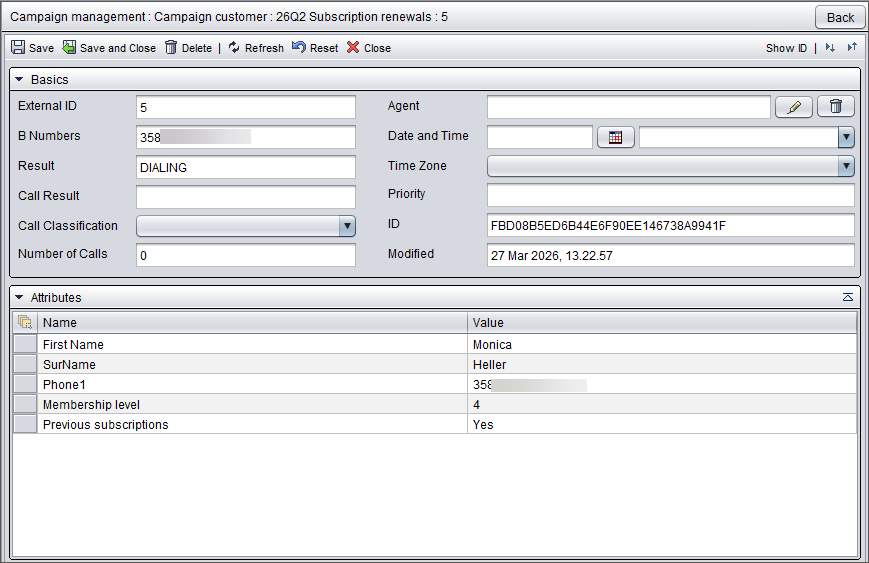
To edit the customer information, double-click the customer.
The Basics block displays the campaign-related information. The values you can edit are Call Classification, Date and Time, Time Zone and Priority.
In the Attributes block, double-clicking a row allows you to edit the information in the Value column.