View campaign information
-
To show a list of all campaigns found in the system, click the Search button without any search criteria. To show only active campaigns, make a search with Status equalling to Active.
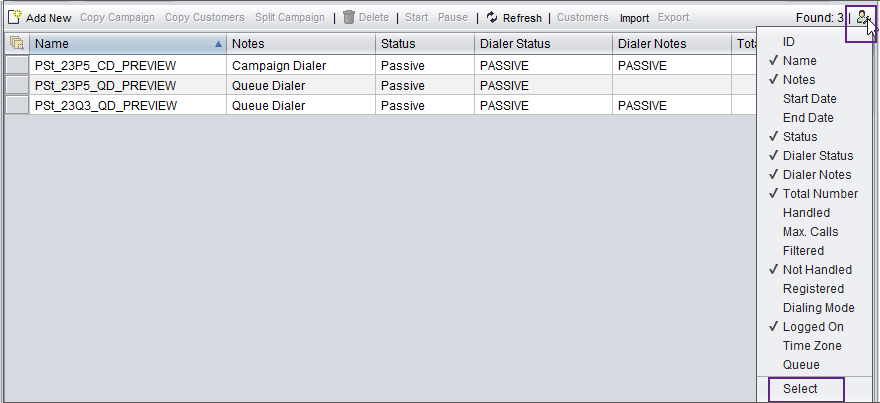
To select which columns are shown in the Campaigns view, click the Personalize button.

The following table lists the columns with descriptions.
Table 1. Colum Description ID Internal ID of the campaign in the system
Name, Notes, Start Date, End Date, Dialing Mode, Time Zone, Queue
Settings you can define for the campaign in its basic settings and call schedule.
Status Shows the campaign status:
Active: Agents serving the queue will be allocated campaign calls.
Deleted: The campaign is marked for deleting.
Expired: The End Date time defined for the campaign has passed. Expring may happen though the campaign is not Handled.
Handled: All customers defined for the campaign have been called.
Invalid: Mandatory campaign settings are missing, for example, the dialer has not been defined.
Passive: The campaign is either paused, or it has not been activated yet.
Dialer status Displays the dialer status:
OPEN: Campaign calls are being dialed.
EXPIRED: The End Date time defined for the campaign has passed.
COMPLETED: All customers defined for the campaign have been called.
PASSIVE: The campaign is either paused, or it has not been activated yet.
INVALID: Mandatory campaign settings are missing, for example, the dialer has not been defined.
SHUTDOWN: CEM Server or its dialing module is being closed down.
CLOSING_CAMPAIGN: Campaign is being closed down.
SUSPEND: Campaign is temporarily inactive because of its schedule.
A closed campaign means that the dialer status is other than OPEN, for example, COMPLETED or PASSIVE.
Dialer Notes
Messages from the dialer
Total Number
Total number of customers to be called in a campaign
The number appears only after the campaign has been made active.
Handled
The number of customers that have a campaign outcome and do not require more call attempts
Max. Calls
The number of customers that have been called as many times as defined in any of the fields Number of Redials, Number of Redials for Busy Numbers, Number of Redials for Not-reached Cases, or Number of Redials for Answering Machines.
Filtered
Number of customers that have been filtered out from the campaign so will not be called
Not Handled
Number of customers that have not been called yet (who are not Handled, Max. calls, or Filtered)
This number tells you how much of the campaign remains to be completed.
Registered
Date and time when the campaign was created
Logged On
Number of agents currently serving in the campaign Choose the columns and click Select.