
SAP Service Cloud (C4C) and SAP Service Cloud Version 2
You can save the AI analysis in SAP Service Cloud (C4C) and SAP Service Cloud Version 2 It will be shown in the Notes field.
Please follow the relevant directions based on the version you're using: SAP Service Cloud (C4C) or SAP Service Cloud Version 2.
Create a technical user
SAP Service Cloud (C4C)
First define a communication system if you haven't done that previously. For instructions, see the Service configuration document.
Define a communication arrangement:
-
In SAP Service Cloud (C4C), go to .
-
To create a new arrangement, click New.
-
In the Communication Scenario field, select OData Services for Business Objects and click Next.
-
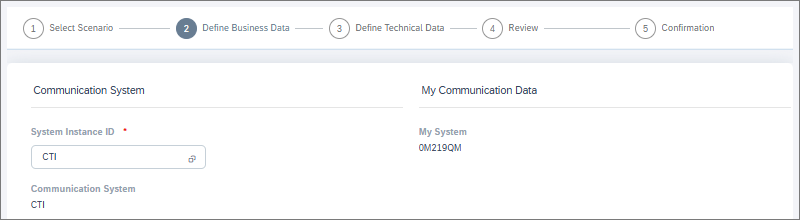
In the Communication System field, select the communication system you created or had defined previously.
-
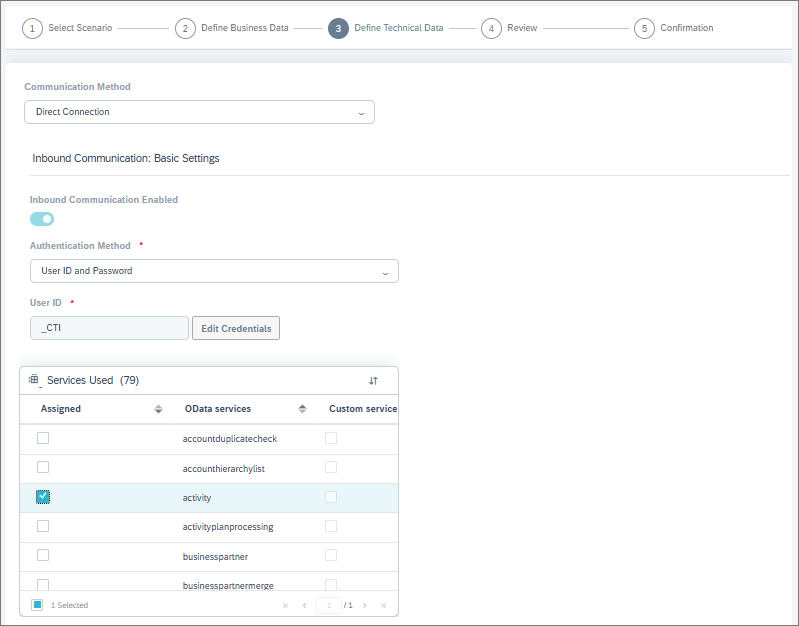
In the Authentication Method field, select User ID and Password (basic authentication).
-
In the User ID field, enter an ID for the user.
-
To set up a password for this integration user, click Edit Credentials and enter a password.
Do not use:
-
letters that aren't part of the Latin alphabet (for example, Scandinavian letters and umlauts)
-
the following special characters: ¤,£,€,½,§
-
-
In the Services Used field, select these OData services:
- activity
- chatactivity
- call_list
- socialmediaactivity
-
To complete the arrangement, click Next and then Finish.
The technical user's credentials (user ID and password) are now ready for use in your event-driven integration's JSON configuration.
SAP Service Cloud Version 2
For instructions, see SAP's documentation.
Enable business services that allow the technical user to save chat notes in the customer's Timeline and verify that this works.
Add a secret in System Configurator for the technical user
-
In System Configurator, go to .
-
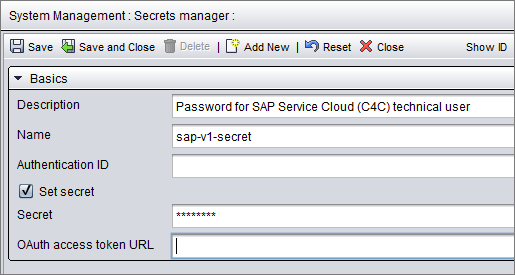
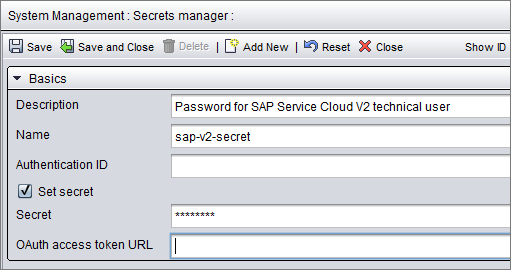
Click Add New and enter the details for your technical user:
-
Description: Describe what this secret is used for.
-
Name: We recommend using the same name (sap-v1-secret or sap-v2-secret) as in this example so you'll be able to use the example JSON below without editing this part. If you define a different name for the secret, you'll just need to change the name in your JSON configuration.
-
Secret: Enter the password of your C4C or SAP Service Cloud Version 2 technical user.
SAP Service Cloud (C4C) secret
SAP Service Cloud Version 2 secret
-
Edit the JSON in your event-driven configuration
You'll need to have an event-driven configuration in System Configurator. See Configure post-chat AI analysis.
Here's an example of what the JSON for configuration field should contain:
{
  "request": {
    "method": "POST",
    "authentication": {
      "type": "oauth",
      "secrets_ref": "orchestration-layer"
    },
    "headers": {
      "x-cmi-api-key": "{secrets.ri-apikey}",
      "x-cmi-password": "{secrets.cmi-user}",
      "x-sap-v1-password": "{secrets.sap-v1-secret}",
      "x-sap-v2-password": "{secrets.sap-v2-secret}"
    },
    "body": {
      "cmi_url": "string",
      "cmi_user": "cmi.user",
      "contact_id": "F944DDB71213499C8F69C054FC4D7C90",
      "contact_group_id": "F944DDB7121349977F69C054FC4D7C90",
      "customAiInstructions": "Use concise summary and focus on unresolved customer issues.",
    "sap_v1": {
      "url": "https://my2554607.de1.crm.cloud.sap",
      "user": "v1user"
    },
    "sap_v2": {
      "url": "https://my2554607.de1.crm.cloud.sap",
      "user": "v2user"
    }
  }
}
The example code includes configurations for both SAP Service Cloud (C4C) (v1) and SAP Service Cloud Version 2 (v2). Only keep the one you need and remove the other one. Edit the following parameters:
-
In the header x-sap-v1-password or x-sap-v2-password: Replace sap-v1-secret or sap-v2-secret with the name of the secret added for accessing your SAP Service Cloud (C4C) or SAP Service Cloud Version 2 environment.
-
In the body, edit the parameters in the sap_v1 or sap_v2 object:
-
url: Replace https://my2554607.de1.crm.cloud.sap with the URL of your SAP Service Cloud (C4C) or SAP Service Cloud Version 2 environment.
-
user: Replace v1user or v2user with the user ID of the technical user you defined in your SAP Service Cloud (C4C)'s or SAP Service Cloud Version 2's communication arrangements.
-
Now your configuration is ready for testing.