
Create a call result list
Call results are control data values that inform Outbound Dialing Controller (ODC) how to react to a call, that is, is the customer considered handled (doesn't require more call attempts), is redialing required, or is the number of allowed redials full. The table below lists available call results.
-
In click Add new.
-
In the Basics block, enter the name for the call result.
-
In the Campaigns block, choose the campaign for which the call result is available.
In the Call results block, enter the text that will be shown to agents in Communication Panel and then choose its call result from the list.
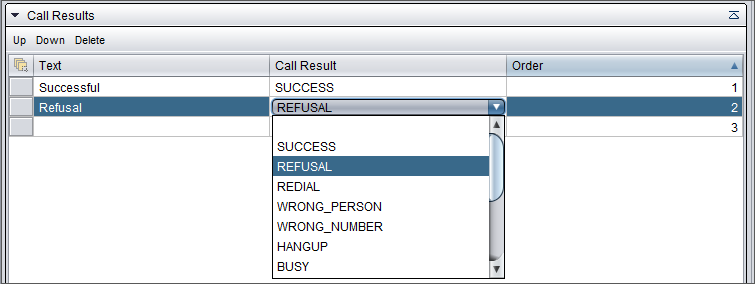
The table below lists available call results and explains how each result considers the called customer.
Table 1. Call result Customer considered SUCCESS Handled
REFUSAL Handled
REDIAL Not handled / Max. calls
This means one of the following. If the maximum number of redials:- has not been reached, redial is required and the customer is Not handled
- has been reached, the customer is at Max. calls
WRONG_PERSON Handled
HANGUP Handled
BUSY Not handled / Max. calls
This means one of the following. If the maximum number of redials:- has not been reached, redial is required and the customer is Not handled
- has been reached, the customer is at Max. calls
NOANSWER Not handled / Max. calls
This means one of the following. If the maximum number of redials:- has not been reached, redial is required and the customer is Not handled
- has been reached, the customer is at Max. calls
FAX If the customer:- has another number to call: Not handled
- does not have another number to call: Handled
MODEM If the customer:- has another number to call: Not handled
- does not have another number to call: Handled
ANSWERING_MACHINE Not handled / Max. calls
This means one of the following. If the maximum number of redials:- has not been reached, redial is required and the customer is Not handled
- has been reached, the customer is at Max. calls
AUTO_ATTENDANT Handled
UNKNOWN If the customer:- has another number to call: Not handled
- does not have another number to call: Handled
INSTANT_REDIAL Not handled / Max. calls
This means one of the following. If the maximum number of redials:- has not been reached, redial is required and the customer is Not handled
- has been reached, the customer is at Max. calls
The system gives the call results an ordinal number. To change the order of the fields, use the Up and Down buttons.
-
Save the call result list.