
Create dialers
Sinch Contact Pro has two built-in dialer types:
QueueDialer
Serving agents receive both incoming queue calls and active campaign calls from all active campaigns defined under a queue dialer queue.
- A Sinch Contact Pro built-in dialer
- Enables campaign calling via an incoming call queue
- Supported modes: preview, progressive, and predictive
CampaignDialer
Serving agents receive both incoming queue calls and active campaign calls from one agent-selected campaign.
- A Sinch Contact Pro built-in dialer
- Enables outbound campaign calling via an incomingcall queue
- Supported modes: preview, progressive, and predictive
-
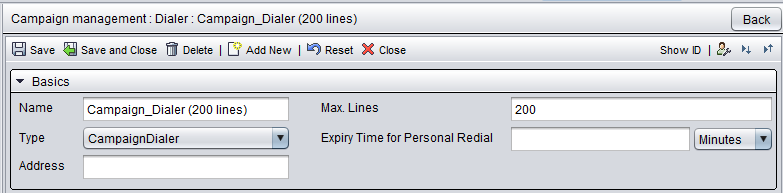
On the System Configurator main screen, choose and click Add new.
- In the Basics block:
-
Enter a dialer name.
-
Choose the dialer type.
-
Enter the number of lines used for making calls in the campaign. Typically the dialers use the default value of 30 phone lines. If IVR is used, the Max. Lines setting defines the maximum number of simultaneous calls.
To define a campaign-specific Max. Lines, use the setting in .
-
-
Save the dialer.