
Use agent guidance or silent monitoring
Depending on the configuration of your system and your user rights, you can start agent guidance or silent monitoring. Clicking these options opens your Communication Panel. For more information about these features, see Agent guidance in the Communication Panel document.
-
To start agent guidance or silent monitoring, use filters to search for the agent.
-
Click the agent name and either:
-
Choose Agent guidance or Silent monitoring.
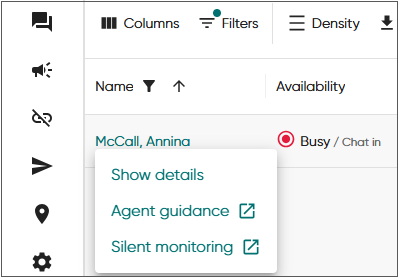
Or
-
Click Show details and start agent guidance/silent monitoring there.
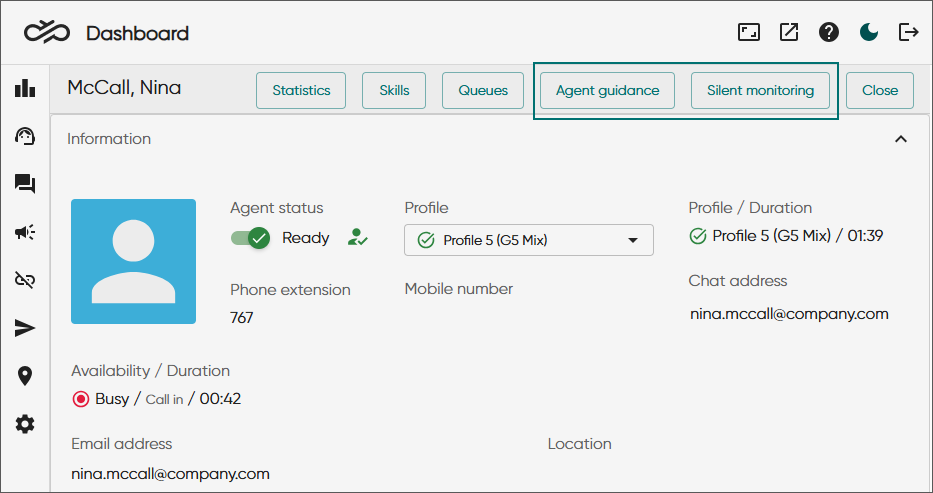
-
Use agent guidance or silent monitoring in CP embedded mode
When using Salesforce and SAP Service Cloud (C4C) integrations with Communication Panel:
-
Open Dashboard from .
-
Start agent guidance or silent monitoring from Dashboard.