
Campaign customers
All customers tab
From the All customers tab, you can view information of customers that have been called in a campaign in addition to those not yet called.
-
Choose the campaign by using the Campaign name filter to select which campaign's customers you want to view.
-
Set the time range for the campaign using the
 button.
You have the following options to clear the set date and time :
-
To reset the time range to its default, click
 .
. -
To empty the time range fields, click
 .
.
-
-
Click Search to view the results.
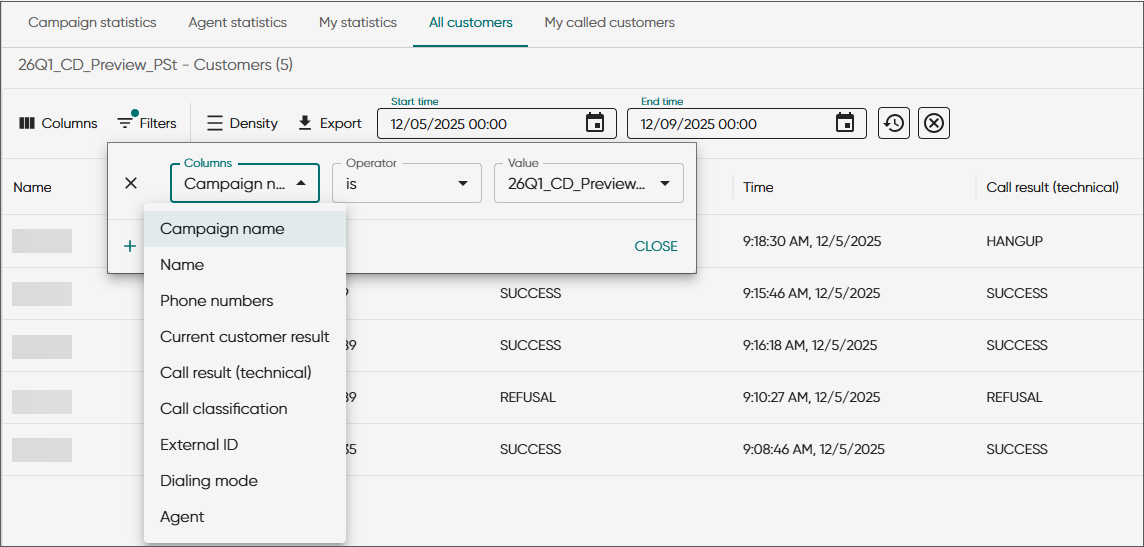
| Column | Description |
|---|---|
| Campaign name | The name of the campaign |
| Name | The name of the customer from campaign data |
| Phone numbers | The customer's phone numbers from campaign data To view the phone conversations had with this customer, click on the phone number link. |
| Current customer result |
The current calling status of the customer in the campaign, automatically assigned by the system Results such as CALL and DIALING mean that there are call attempts remaining. |
| Call result (technical) |
The technical call result, such as SUCCESS, REFUSAL, or NOANSWER The application determines the call result based on the call classification made by the agent or the custom IVR. |
| Call classification |
The classification the agent has chosen for the call or assigned by the custom IVR (for example, New subscription). Alternatively, a classifier can contain a possible Computer Telephony Integration (CTI) code for an unsuccessful call. The campaign administrator maps technical call results to call classifications for each campaign in System Configurator. |
| External ID | The customer ID used in external systems, such as SAP CRM |
| Dialing mode |
Customer-specific dialing mode when different from the campaign level one A campaign running in predicative mode may have certain calls also handled as preview, for example, via an IVR. |
| Agent | The agent who made the call You can only see the agent names if you have rights to view the agents. |
My called customers tab
You can see the same information here as on the All customers tab but only for the customers you've called.