Sinch Chat
Sinch Chat is part of Conversation API offering and provides in-app chat two-way,
back-and-forth conversation that a user can have inside a business' mobile app with a
customer representative. You can create and customize your own web chat application in
Sinch Dashboard
 and connect
the chat with Sinch Contact Pro. Additionally, Sinch Chat provides an SDK to create your own
chat client and is aligned with web content accessibility guidelines (WCAG) and
European Accessibility Act (EAA) standards. For more information, see Sinch Chat documentation
.
and connect
the chat with Sinch Contact Pro. Additionally, Sinch Chat provides an SDK to create your own
chat client and is aligned with web content accessibility guidelines (WCAG) and
European Accessibility Act (EAA) standards. For more information, see Sinch Chat documentation
.
- Chat between customer and agent
- Rich content
- Agent joined and left discussion events
- Agent’s chat name displayed for end customer
- Customer to end the chat discussion
Configuration
You can transfer information from Sinch Chat to Sinch Contact Pro via attached data. For more information about attached data, see Examples. Note that Sinch Contact Pro discards any attached data sent by a customer's End chat event if the agent has already closed the chat session.
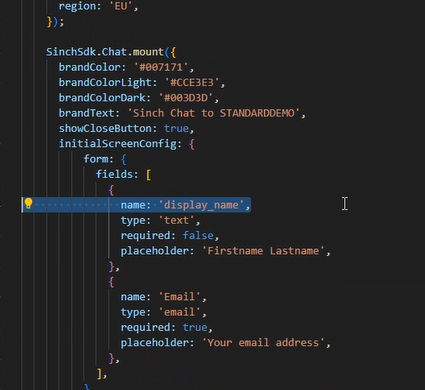
To transfer a customer name, collect the information in Sinch Chat using display_name. For example, if the customer hasn't logged in to your website, the Sinch Chat application needs to ask for the customer's name and then insert the collected value into the display_name function. If the customer is known and logged in, the display name value is inserted automatically.
To identify a customer from Sinch Chat in SAP Service Cloud (C4C) version 1 or 2, use the function Email. Note that the value for Email is case-sensitive. Sinch Contact Pro delivers the email address to SAP for business partner identification.