
Delivery notifications for sent messages
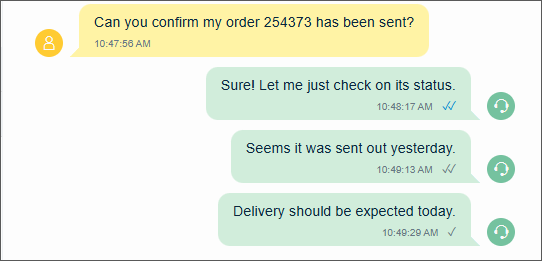
Delivery status notifications for conversational messaging chats via Conversation API are supported. This means that agents see the following icons when their message has been:
-
sent

The message was successfully submitted to the messaging platform.
-
delivered

The message was successfully delivered to the recipient’s device.
-
read

The recipient has opened/viewed the message.
-
If there are layers in between Sinch Contact Pro and Conversation API (such as Chatlayer) this feature may not work.
-
Delivery status notifications for
read
events are not available for the SMS and Telegram channels.
The table below shows which integration methods support delivery notifications.
| Integration method | Delivery notifications supported |
|---|---|
|
Integrating conversational messaging channels to Sinch Contact Pro directly via Conversation API |
Supported When you configure Conversation API and want to show delivery
notifications in Communication Panel, choose the MESSAGE_DELIVERY trigger. For
more information, see Callbacks
|
|
Integrating conversational messaging channels to Sinch Contact Pro via Contact Offload |
Not supported |
|
Integrating conversational messaging channels to Sinch Contact Pro via Orchestrator |
Supported When you configure Conversation API and want to show delivery
notifications in Communication Panel, choose the MESSAGE_DELIVERY trigger. For
more information, see Callbacks
|
|
Integrating via Chatlayer (out-of-the-box integration) |
Not supported |
 .
.